What Is PoE++ and Why Does It Matter for Network Design?
Power over Ethernet (PoE) lets a network cable carry both data and electrical power. That can simplify installations for devices such as wireless access points, cameras and phones: instead of running a separate power circuit to every device, you can deliver power from a network switch over Ethernet.
PoE++ is the common name for higher-power PoE, based on the IEEE 802.3bt standard. It enables network cabling to support equipment that needs more power than earlier PoE standards could provide. That matters as organisations add more capable wireless access points, multi-sensor cameras, digital signage and other connected equipment.
But PoE++ is not just a matter of buying a switch with a bigger wattage figure on the box. It affects switch selection, cabling, heat, resilience, segmentation and ongoing operations. Get the design right and PoE++ devices can be simpler to deploy and manage. Get it wrong and power shortages or physical-layer faults can become outages—and create security blind spots.
What Does PoE++ Mean?
“PoE++” is widely used to describe the higher-power capabilities of IEEE 802.3bt. The standard has two power types:
- Type 3: supplies up to 60 watts from the power sourcing equipment (PSE), such as a switch. The powered device (PD) can receive up to about 51 watts.
- Type 4: supplies up to 90 watts from the PSE, with up to about 71 watts available at the powered device.
The difference between the switch’s output and the power available to the device is due to losses along the cable. Actual delivery depends on the equipment, cable length and installation conditions. Always check the device’s power requirements and the switch manufacturer’s Home page specifications rather than treating “PoE++” as a guarantee that every port delivers the same usable power.
Earlier PoE standards still have an important role. IEEE 802.3af, often called PoE, provides up to 15.4 watts at the switch; 802.3at, commonly called PoE+, provides up to 30 watts. A mixed network may use all three levels, so the design needs to match each port to the device it serves.
Which Devices Need PoE++?
Many everyday endpoints do not need PoE++. A basic desk phone or a simple camera may work perfectly well with standard PoE or PoE+. Higher-power equipment is where 802.3bt becomes useful. Examples include:
- Advanced wireless access points with multiple radios or high-performance features.
- Pan-tilt-zoom, multi-sensor or heated outdoor cameras.
- Video conferencing equipment and some interactive displays.
- Building systems and specialised industrial devices that draw more power.
- Some compact lighting or other connected equipment, where supported by the device and the installation.
Check the manufacturer’s documentation for both normal and peak power draw. A camera may use more power when its heater or infrared lighting is active. An access point may have different requirements depending on its enabled radios and features. These details make a difference when calculating how many devices a switch can reliably support.
Power Budget Planning: The Number That Matters
One of the most common design mistakes is to count PoE ports without checking the switch’s total power budget. A switch might have 48 PoE-capable ports, but that does not necessarily mean it can provide maximum power to all 48 at once. The shared power supply may have a lower total capacity.

Good power budget planning starts with an inventory of the endpoints and their requirements. For each device, record its PoE standard, expected power draw and any peak or start-up demand. Then total the load and compare it with the usable PoE budget of the proposed switch. Allow for growth and avoid designing right up to the limit.
Planning item What to check Why it matters Device power Required standard, typical draw and peak draw A device may need more power during certain operating modes. Switch budget Total available PoE power, not just the port count The switch has to supply the combined load across active ports. Resilience Power-supply redundancy and UPS runtime Power protection is only useful if it covers the full design load. Growth Spare capacity for planned devices and expansion Headroom helps avoid an emergency switch replacement later. Environment Temperature, airflow and cable route Heat and installation conditions can affect reliability and performance.Consider what happens when a switch reboots or a power supply fails. Which devices come back first? Will access points, phones and cameras all draw power simultaneously after recovery? At 2am, when nobody is on site, a design with no capacity margin can turn a brief power event into a prolonged outage.
PoE++ and the Physical Layer
It is tempting to treat cabling as “just plumbing”. In practice, physical infrastructure is part of cybersecurity. Network performance, visibility and availability all depend on a reliable path from the switch to the endpoint. That includes cables, patch panels, connectors, power supplies and the way equipment is installed and labelled.
PoE++ places additional demands on the cabling system because more power is carried over the Ethernet link. Use cabling and components suitable for the required application, follow installation guidance, and consider cable bundle size and temperature. Poor termination, damaged cable or crowded bundles can contribute to faults and heat. Do not assume an existing cable plant is suitable just because it passes a basic link test.
Physical-layer faults create both outages and security blind spots. An intermittent link may cause a camera to drop out, an access point to disconnect or monitoring data to arrive inconsistently. That can leave a genuine gap in coverage—or make a device appear unavailable when investigating an incident. Mystery cables, unlabelled patch panels and unmanaged switches make these problems harder to find and can conceal unauthorised connections.
Document and label both ends of every cable, keep patching records current, and use approved components. I keep a label maker in my laptop bag for a reason: a clear label can save hours when tracing a fault under pressure. It also helps teams verify which device is connected to which port and whether that connection belongs in the network design.
PoE Switches, Segmentation and Security
PoE switches provide power, but they are also part of the network’s security boundary. Segmentation depends on capable switching and correct design—not on the cable type or power standard. A camera powered by PoE++ is not automatically isolated from corporate systems. Its security depends on how the switch ports, VLANs, routing and access controls are configured.
Separate devices according to their function and risk. For example, cameras, wireless access points, voice devices and building systems may belong in different network segments, with only necessary communication allowed between them. Use switch features such as VLAN support, access control lists and port security where appropriate. Confirm how those controls interact with routing and firewalls, and test the intended traffic paths rather than relying on a diagram alone.
Firewalls can enforce policy between network zones, while endpoint detection platforms can help identify suspicious behaviour on supported endpoints. Neither tool can compensate for an unmanaged switch that bypasses intended controls or a faulty link that quietly removes a device from monitoring. Security tools need sound network foundations and reliable connectivity to do their jobs.
Choose PoE switches that meet both power and security https://smoothdecorator.com/what-is-the-quickest-win-for-network-security-without-new-software/ requirements. Compare the available power budget, port speeds, management features, resilience options and environmental ratings. Vendors such as Cisco, Garland and MOXA offer different switching options across enterprise, industrial and other deployment contexts. Assess each product against the actual site requirements; a brand name alone does not determine whether a switch is suitable.
Industrial and Distributed Sites Need Extra Care
In offices, switches are often installed in controlled communications rooms. In warehouses, transport sites, factories or outdoor locations, equipment may face dust, vibration, temperature changes and limited access. A standard office switch may not be appropriate for those conditions. Industrial-rated equipment, including options from vendors such as MOXA, may be worth evaluating where environmental requirements call for it.
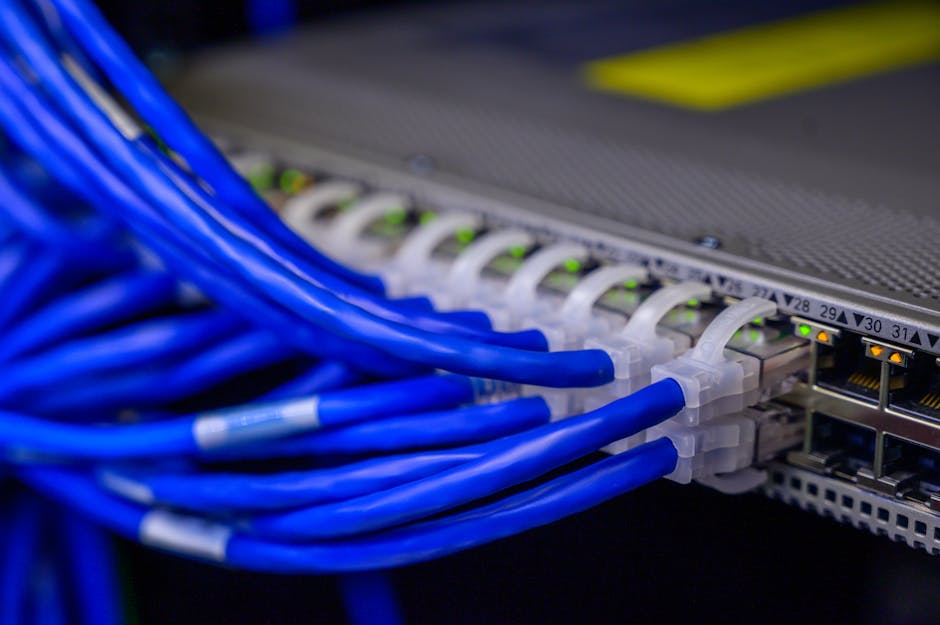
Plan for where power will come from and how it will be protected. A PoE switch can reduce the need for local power supplies at endpoints, but it still needs a dependable power source. Check UPS capacity, generator arrangements where relevant, ventilation, earthing and maintenance access. If the switch is in a remote cabinet, consider how staff will identify its status and replace it safely.
Industrial deployments can also involve operational technology (OT), where availability and safe operation may be critical. Keep OT devices separated from corporate IT as required by the risk assessment, control permitted pathways, and coordinate network changes with the people responsible for the process. A quick port change can have consequences beyond network connectivity.
ACSC Guidance Starts with Sound Foundations
Australian organisations should consider the Australian Cyber Security Centre (ACSC) guidance relevant to their systems and risk profile. That guidance assumes organisations have workable network foundations: assets are understood, access is controlled, systems are maintained, and network boundaries are designed deliberately. PoE++ does not replace these practices. It makes it even more important to know what is connected, where it is connected and how it is powered.
Build an accurate inventory of switches and powered devices. Keep firmware and configuration management processes in place, restrict administrative access, change default credentials, and monitor for unexpected devices or configuration changes. Include network infrastructure in incident response planning so responders know how to isolate an affected port or segment without creating a larger outage.
A Practical PoE++ Design Checklist
- Inventory the endpoints. Record device locations, power requirements, network function and criticality.
- Calculate the load. Check the switch’s total PoE budget and leave practical headroom for growth and peak demand.
- Validate the cabling. Confirm the cable plant, connectors, patching and installation conditions suit the required power and data rates.
- Design the segments. Place devices into appropriate network zones and document permitted traffic flows.
- Check resilience. Review switch redundancy, power supplies, UPS capacity and recovery behaviour.
- Secure management. Remove default credentials, restrict administrative access and maintain approved configurations.
- Label and test. Identify ports and cables, then test connectivity, power delivery, monitoring and recovery under realistic conditions.
- Plan operations. Make sure support staff can diagnose a fault remotely and know what to do when a device or switch fails out of hours.
PoE++ Is a Network Design Decision
PoE++ can make it easier to deploy powerful network-connected equipment without installing a separate power outlet at every endpoint. Its benefits are real, but they depend on more than choosing high-wattage ports. Power budget planning, suitable cabling, capable PoE switches, deliberate segmentation and sound operational practices all matter.
Most importantly, treat the physical network as part of the security architecture. A damaged link, undocumented patch or overloaded switch can undermine availability and visibility just as surely as a misconfigured firewall. Design for the device you need today, leave room for tomorrow, and ask the practical question before sign-off: what happens at 2am when this fails?